October 7, 2025
The First AI Hardware Engineering Intern

Share
BuildWithFlux





With this release, Flux can take your requirements, generate a complete plan, and execute multi-step workflows right inside the editor. It researches components, builds schematics, places and routes parts, and runs checks along the way — pausing for your feedback when it needs direction.
Think of it as your first AI intern: fast, explainable, and eager to learn — but still guided by someone who knows the craft. Flux works transparently, explains its reasoning, and remembers how you like to work.
It’s the biggest step yet toward the first true AI hardware engineer.
This new functionality is available now. Log in to Flux today to take it for a spin. Full workflow capabilities will roll out gradually over the coming days.
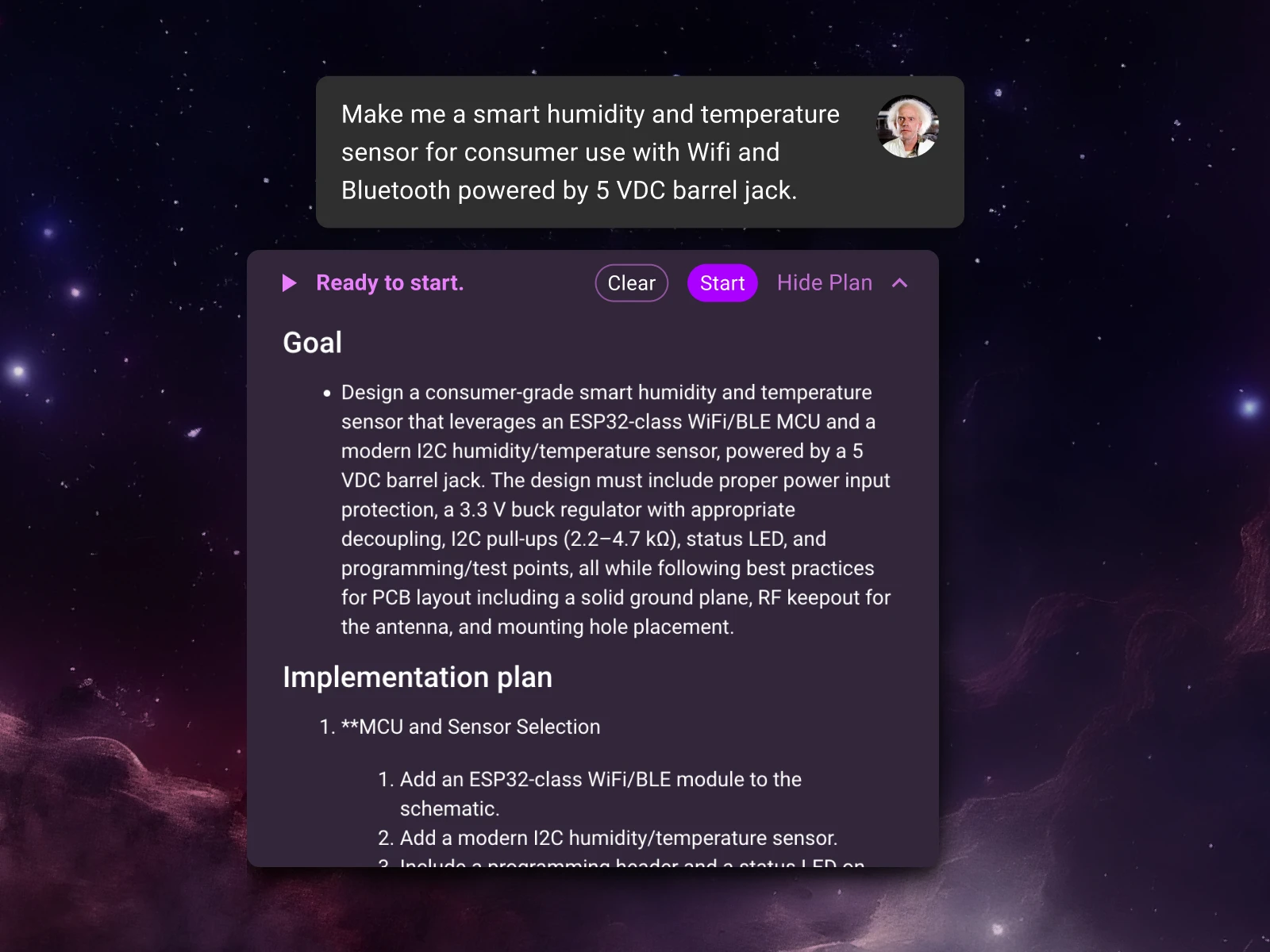
Start by telling Flux what you need to build. Flux now understands design requirements—the goals, constraints, and specs that define your project. Describe the functionality, power targets, interfaces, layer count, or components you want to use, and Flux will turn that into a complete, step-by-step plan.
You’ll see a clear outline of the plan: parts research, schematic creation, layout, checks, and milestones for review. From there, simply tell Flux about any desired changes—add details, reorder tasks, or lock decisions—and it will refine the plan for you. It’s up to you how in the weeds you get.
Next, click “Start” and Flux will begin get to work, sharing progress and decisions along the way, and checking in with you at key points to get your feedback.
“Design a sub-25 × 25 mm wearable PCB with Bluetooth, an accelerometer, and on-board battery charging.
It must include a BLE SoC (OTA-capable), a low-power accelerometer with interrupt/wake, power-path + charging for a 1-cell Li-ion/LiPo, and headers/pads for programming and test.
Power: 1-cell Li-ion/LiPo with on-board charger (5 V USB input) optimized for low quiescent current.”
{{button-1}}
“Design a compact field-oriented control (FOC) BLDC motor driver board.
It must include Bluetooth Low Energy for wireless control and data-logging.
The key subsystems are: power stage and gate drive, sensing, MCU selection, comms, and protection to thermal/mechanical stress.
Power: USB-C PD at 12 V (with local regulation as required).”
{{button-2}}
“Design a low-noise electret microphone preamplifier for a 24-bit ADC, integrated into a consumer household device.
It must have switchable 20–40 dB gain, correctly sized coupling capacitors with a ~20 Hz high-pass, an output anti-alias RC for ~20 kHz bandwidth, and thorough decoupling plus pop-suppression.
Follow the op-amp, microphone, and ADC datasheets and industry best practices; use the 3.3 V analog rail and make cost-effective component choices without asking for spec confirmation.
Power: USB-C 5 V input (with local regulation as required).”
{{button-3}}
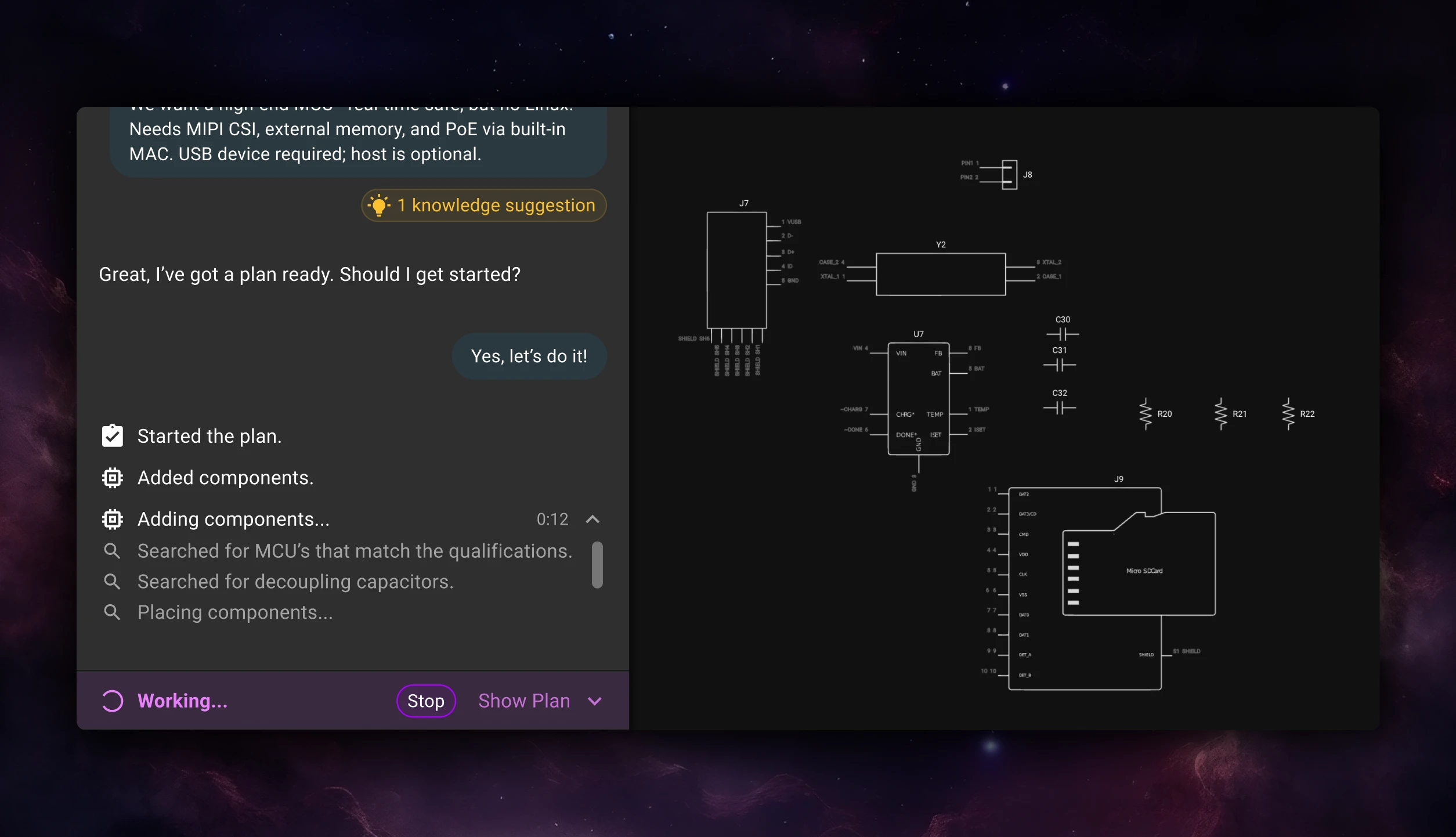
When you approve a plan, Flux doesn’t just hand you suggestions—it gets to work.It now executes full workflows inside the editor, acting like an extension of your team that can solve real problems while keeping you in the loop.
Flux handles the structured parts of the process—researching components, wiring schematics, placing and routing parts, and reviewing its own work for correctness—while you focus on the decisions that need human judgment.
You can think of it like having an intern on your team who works fast, communicates clearly, and never forgets a detail. Feel free to close your browser or go for a walk, Flux will keep working in the background, and drop you a line when it’s time to check in.
Flux is built for collaboration. Every plan, action, and decision it makes is visible and explainable so you can review, guide, and adjust as it goes.
You can pause execution, modify the plan mid-flow, or roll back using version history. Lock regions, nets, or components to prevent changes, or ask Flux to revisit a specific step. And because Flux runs inside a full browser-based ECAD, you can jump in and edit anytime—make manual tweaks, move parts, or add your own changes without breaking its flow.
Flux doesn’t just follow instructions—it learns through your conversations and feedback. When you correct something or clarify how you like to work, Flux can ask if you want to remember it. You choose whether that learning should apply just to the project you’re in or across your entire account.
Over time, Flux picks up the same kind of tribal knowledge your team already shares—naming conventions, layout habits, design rules—and starts applying them automatically. You can refine what it remembers, edit entries, or forget things entirely through the Knowledge Base.
It’s how you teach Flux to work the way you do—so it keeps getting smarter, faster, and more aligned with your standards. Learn more.
The new planning and execution architecture inside Flux is designed to scale—so the agent you’re working with today will keep getting smarter and more capable over time.
This is just the beginning. You can already fork your projects and have Flux explore multiple directions in parallel. Soon you’ll be able to delegate even broader, more complex, assignments to Flux, and have it build even more advanced boards.
We envision a future where Flux is not just one AI intern, but a coordinated group of AI engineers, each with their own specialization, that seamlessly integrate with your team. The endgame is a world where hardware teams are infinitely scalable: totally parallel, deeply collaborative, and still human-led.
Hardware is entering a new era—where AI becomes part of the team, instead of part of the toolkit.
It starts here. Give Flux a job, review the plan, and help define how engineers and AI build hardware together.
{{try-plans-ai-workflows}}
With this release, Flux can take your requirements, generate a complete plan, and execute multi-step workflows right inside the editor. It researches components, builds schematics, places and routes parts, and runs checks along the way — pausing for your feedback when it needs direction.
Think of it as your first AI intern: fast, explainable, and eager to learn — but still guided by someone who knows the craft. Flux works transparently, explains its reasoning, and remembers how you like to work.
It’s the biggest step yet toward the first true AI hardware engineer.
This new functionality is available now. Log in to Flux today to take it for a spin. Full workflow capabilities will roll out gradually over the coming days.
Start by telling Flux what you need to build. Flux now understands design requirements—the goals, constraints, and specs that define your project. Describe the functionality, power targets, interfaces, layer count, or components you want to use, and Flux will turn that into a complete, step-by-step plan.
You’ll see a clear outline of the plan: parts research, schematic creation, layout, checks, and milestones for review. From there, simply tell Flux about any desired changes—add details, reorder tasks, or lock decisions—and it will refine the plan for you. It’s up to you how in the weeds you get.
Next, click “Start” and Flux will begin get to work, sharing progress and decisions along the way, and checking in with you at key points to get your feedback.
“Design a sub-25 × 25 mm wearable PCB with Bluetooth, an accelerometer, and on-board battery charging.
It must include a BLE SoC (OTA-capable), a low-power accelerometer with interrupt/wake, power-path + charging for a 1-cell Li-ion/LiPo, and headers/pads for programming and test.
Power: 1-cell Li-ion/LiPo with on-board charger (5 V USB input) optimized for low quiescent current.”
{{button-1}}
“Design a compact field-oriented control (FOC) BLDC motor driver board.
It must include Bluetooth Low Energy for wireless control and data-logging.
The key subsystems are: power stage and gate drive, sensing, MCU selection, comms, and protection to thermal/mechanical stress.
Power: USB-C PD at 12 V (with local regulation as required).”
{{button-2}}
“Design a low-noise electret microphone preamplifier for a 24-bit ADC, integrated into a consumer household device.
It must have switchable 20–40 dB gain, correctly sized coupling capacitors with a ~20 Hz high-pass, an output anti-alias RC for ~20 kHz bandwidth, and thorough decoupling plus pop-suppression.
Follow the op-amp, microphone, and ADC datasheets and industry best practices; use the 3.3 V analog rail and make cost-effective component choices without asking for spec confirmation.
Power: USB-C 5 V input (with local regulation as required).”
{{button-3}}
When you approve a plan, Flux doesn’t just hand you suggestions—it gets to work.It now executes full workflows inside the editor, acting like an extension of your team that can solve real problems while keeping you in the loop.
Flux handles the structured parts of the process—researching components, wiring schematics, placing and routing parts, and reviewing its own work for correctness—while you focus on the decisions that need human judgment.
You can think of it like having an intern on your team who works fast, communicates clearly, and never forgets a detail. Feel free to close your browser or go for a walk, Flux will keep working in the background, and drop you a line when it’s time to check in.
Flux is built for collaboration. Every plan, action, and decision it makes is visible and explainable so you can review, guide, and adjust as it goes.
You can pause execution, modify the plan mid-flow, or roll back using version history. Lock regions, nets, or components to prevent changes, or ask Flux to revisit a specific step. And because Flux runs inside a full browser-based ECAD, you can jump in and edit anytime—make manual tweaks, move parts, or add your own changes without breaking its flow.
Flux doesn’t just follow instructions—it learns through your conversations and feedback. When you correct something or clarify how you like to work, Flux can ask if you want to remember it. You choose whether that learning should apply just to the project you’re in or across your entire account.
Over time, Flux picks up the same kind of tribal knowledge your team already shares—naming conventions, layout habits, design rules—and starts applying them automatically. You can refine what it remembers, edit entries, or forget things entirely through the Knowledge Base.
It’s how you teach Flux to work the way you do—so it keeps getting smarter, faster, and more aligned with your standards. Learn more.
The new planning and execution architecture inside Flux is designed to scale—so the agent you’re working with today will keep getting smarter and more capable over time.
This is just the beginning. You can already fork your projects and have Flux explore multiple directions in parallel. Soon you’ll be able to delegate even broader, more complex, assignments to Flux, and have it build even more advanced boards.
We envision a future where Flux is not just one AI intern, but a coordinated group of AI engineers, each with their own specialization, that seamlessly integrate with your team. The endgame is a world where hardware teams are infinitely scalable: totally parallel, deeply collaborative, and still human-led.
Hardware is entering a new era—where AI becomes part of the team, instead of part of the toolkit.
It starts here. Give Flux a job, review the plan, and help define how engineers and AI build hardware together.
{{try-plans-ai-workflows}}


Streamline component research with Flux Copilot. Copilot links to components for quick part research, offering multiple options tailored to your needs, and find part alternatives effortlessly without switching between tabs and platforms.

Learn five practical tips to improve PCB routing with AI Auto-Layout, including differential pairs, power traces, rule sets, zones, and convergence strategies.
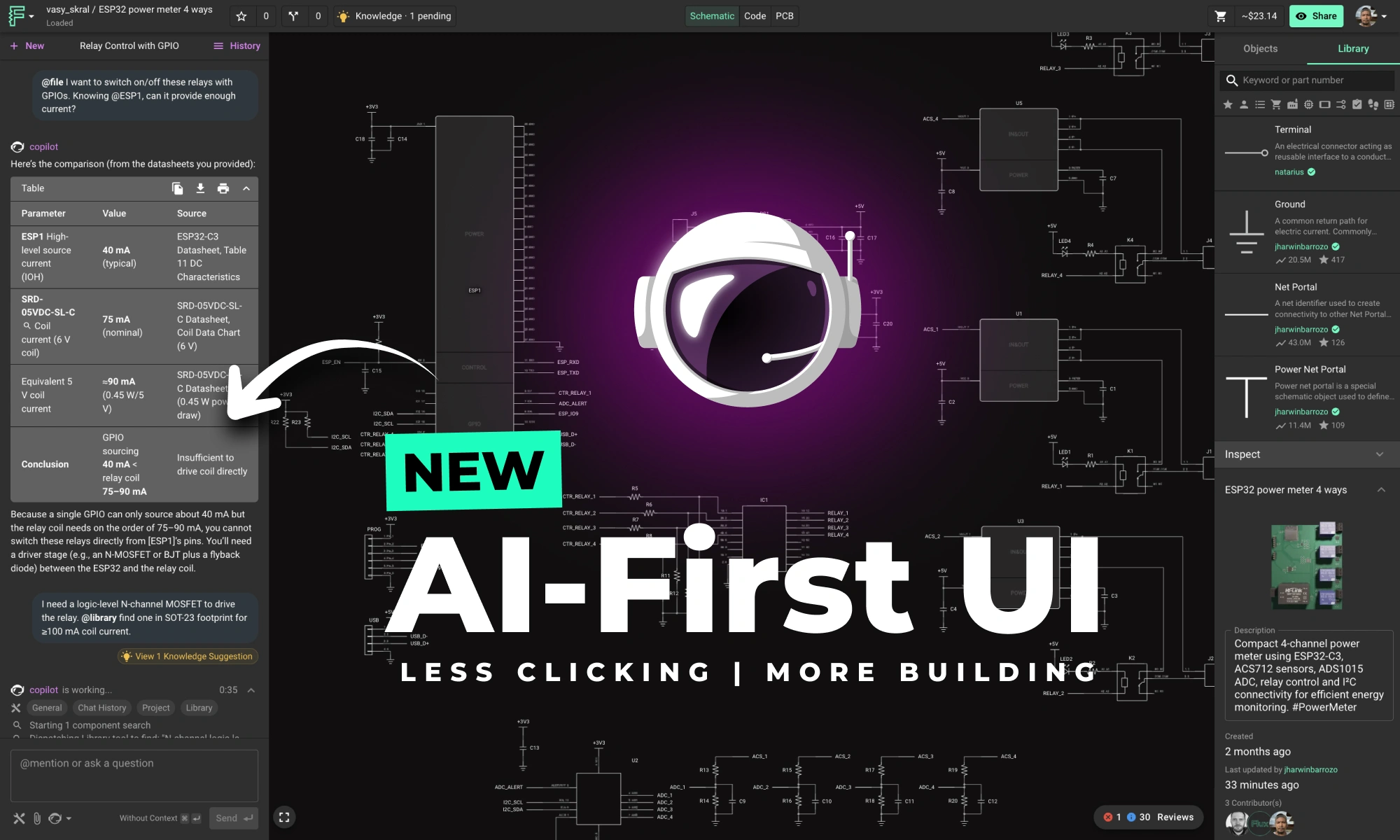
This update brings more than just polish—it’s the foundation for a faster, more fluid design experience, built around the way Copilot is used today and the way we see it evolving tomorrow.

AI Auto Layout’s Winter Update delivers cleaner, more human-like routing with faster, more reliable results. It handles most of the routing workload so you can focus on the critical parts of your PCB design.

We're excited to reveal a major upgrade - Flux Copilot is transitioning from being a helpful guide to a proactive partner. It no longer just advises but, with your approval, can now wires components together! This is a small step towards fully generative AI, reducing the time and complexity often associated with component connections.

We wanted to bring the power of Python directly into our users' hands so that you can augment your workflows with custom scripts that automate your design and analysis tasks. That’s why, today we’re excited to be introducing Copilot’s Code Interpreter.

Today, we’re excited to be launching the next step in Copilot’s evolution: the Copilot Context Menu. It lets you access Copilot with the click of a button. Simply right-click on a component or project, and choose the prompt you want to use.

Today, we’re excited to share our Summer Update to Flux AI Auto‑Layout, a collection of improvements designed to make one‑click PCB routing more reliable, transparent, and adaptable to your real‑world workflows.

We’ve been so amazed with the ways you’ve used Copilot to brainstorm, debug, and conduct part research that we’ve compiled some of our favorite prompts you can copy and paste, or modify for your own use!

A case study: Learn how Agri-iO reimagined farm automation with custom hardware designed in Flux.

Copilot bridges the firmware<>hardware gap by providing firmware engineers with direct access to hardware information like netlists and pins, streamlining firmware development and reducing delays.

Today, we’re thrilled to launch a powerful new feature that allows you to declare project requirements like operating temperature, voltage, or compliance standards so Copilot can leverage that knowledge to accelerate tedious tasks like BOM verification, debugging, and part recommendations freeing you to do more of the work you love.