





In the right scenarios, it’s already delivering sharper reasoning, smarter reviews, and more accurate design decisions than anything we’ve shipped before. We wanted to get it into your hands immediately so you can explore what’s possible alongside us. It’s early, it’s raw, and we want you to push it. Break it. Tell us where it shines.
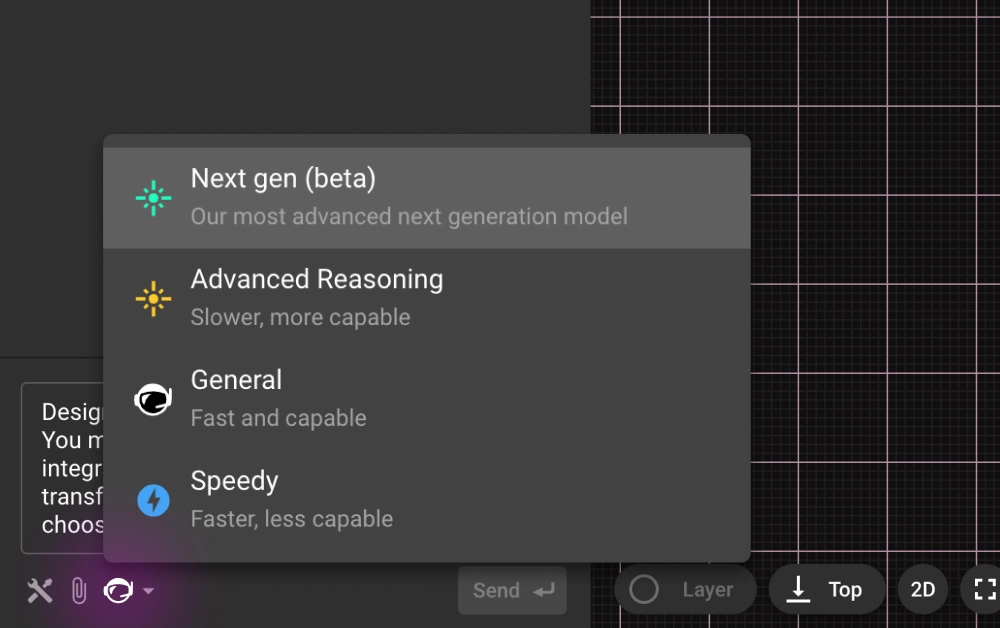
You can start using it right away. Open any project in Flux and launch Copilot. Click the model dropdown at the top of the chat panel, select “Next-gen” and then give it a real challenge. Some great starter prompts to see its strengths include:
“Perform a top-to-bottom schematic review for correctness, completeness, and robustness. Assess power, clocks/resets, signal interfaces, analog paths, protection, and passive choices.”
“Replace all low-stock parts with alternatives that meet the same constraints.”
{{try-gpt5}}
The upgrade isn’t just that GPT-5 is a newer model. It brings a different caliber of intelligence to Copilot:
These improvements land harder in Flux because Copilot already has deep, live context on your design—down to parts, pins, nets, properties, constraints, and stackups—so reinforcement models and LLMs can work side-by-side from the canvas up to system architecture. And because Flux is built for agentic workflows—stepwise actions, constraint-aware edits, and iterative design loops right where you work—GPT-5 isn’t starting from scratch; it applies improved reasoning directly to your schematic or layout. Layered on top is a knowledge base of industry best practices and embedded design/process checks, so your AI partner starts from seasoned experience and turns that context into answers that are immediately relevant and actionable.
{{underline}}
In just 48 hours of testing, we saw moments that made us stop and say, “This is new.”
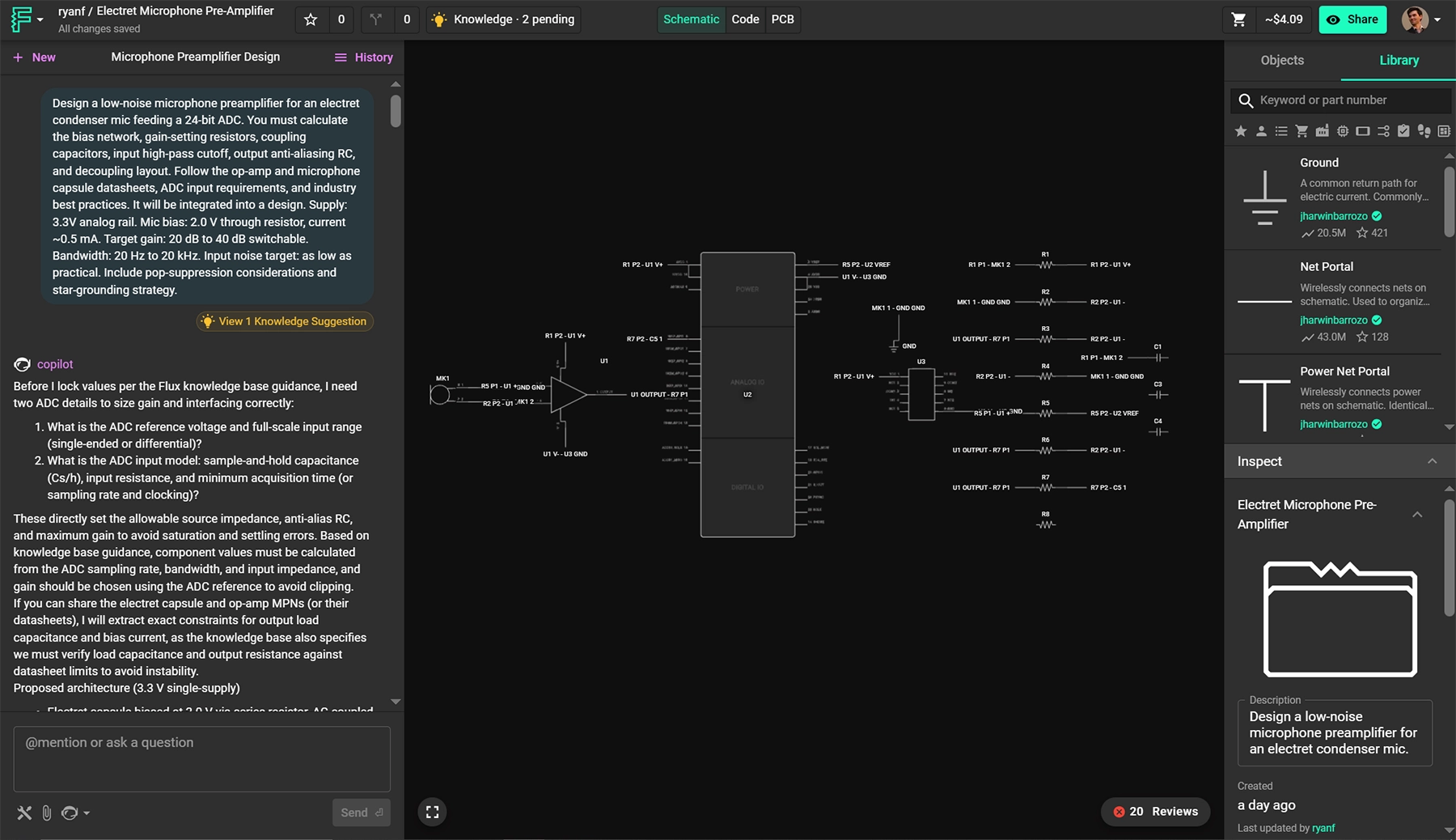
Design a low-noise microphone preamplifier for an electret condenser mic feeding a 24-bit ADC. You must calculate the bias network, gain-setting resistors, coupling capacitors, input high-pass cutoff, output anti-aliasing RC, and decoupling layout. Follow the op-amp and microphone capsule datasheets, ADC input requirements, and industry best practices. It will be integrated into a design. Supply: 3.3V analog rail. Mic bias: 2.0 V through resistor, current ~0.5 mA. Target gain: 20 dB to 40 dB switchable. Bandwidth: 20 Hz to 20 kHz. Input noise target: as low as practical. Include pop-suppression considerations and star-grounding strategy.
{{copy-the-prompt}}
In this case Flux took a plain-English prompt and produced a full low-noise mic preamp to a 24-bit ADC—calculating the right bias, gain, and filter values, choosing real parts, then placing and wiring the entire block with decoupling, VCM bias, and star-ground best practices. It even audited itself (fixed missed ties, made gain legs switchable). The result is a ready-to-review schematic 80% away from layout built end-to-end—complex, competent, and fast.
{{underline}}
{{underline}}
Right now GPT-5 powers Copilot’s chat, but this is just the beginning. We’re already working on:
Open Flux now, switch Copilot to “Next-gen” and see how it handles your next design challenge. The sooner you try it, the more your feedback can shape the next leap in AI-powered hardware design.
{{try-gpt5}}
In the right scenarios, it’s already delivering sharper reasoning, smarter reviews, and more accurate design decisions than anything we’ve shipped before. We wanted to get it into your hands immediately so you can explore what’s possible alongside us. It’s early, it’s raw, and we want you to push it. Break it. Tell us where it shines.
You can start using it right away. Open any project in Flux and launch Copilot. Click the model dropdown at the top of the chat panel, select “Next-gen” and then give it a real challenge. Some great starter prompts to see its strengths include:
“Perform a top-to-bottom schematic review for correctness, completeness, and robustness. Assess power, clocks/resets, signal interfaces, analog paths, protection, and passive choices.”
“Replace all low-stock parts with alternatives that meet the same constraints.”
{{try-gpt5}}
The upgrade isn’t just that GPT-5 is a newer model. It brings a different caliber of intelligence to Copilot:
These improvements land harder in Flux because Copilot already has deep, live context on your design—down to parts, pins, nets, properties, constraints, and stackups—so reinforcement models and LLMs can work side-by-side from the canvas up to system architecture. And because Flux is built for agentic workflows—stepwise actions, constraint-aware edits, and iterative design loops right where you work—GPT-5 isn’t starting from scratch; it applies improved reasoning directly to your schematic or layout. Layered on top is a knowledge base of industry best practices and embedded design/process checks, so your AI partner starts from seasoned experience and turns that context into answers that are immediately relevant and actionable.
{{underline}}
In just 48 hours of testing, we saw moments that made us stop and say, “This is new.”
Design a low-noise microphone preamplifier for an electret condenser mic feeding a 24-bit ADC. You must calculate the bias network, gain-setting resistors, coupling capacitors, input high-pass cutoff, output anti-aliasing RC, and decoupling layout. Follow the op-amp and microphone capsule datasheets, ADC input requirements, and industry best practices. It will be integrated into a design. Supply: 3.3V analog rail. Mic bias: 2.0 V through resistor, current ~0.5 mA. Target gain: 20 dB to 40 dB switchable. Bandwidth: 20 Hz to 20 kHz. Input noise target: as low as practical. Include pop-suppression considerations and star-grounding strategy.
{{copy-the-prompt}}
In this case Flux took a plain-English prompt and produced a full low-noise mic preamp to a 24-bit ADC—calculating the right bias, gain, and filter values, choosing real parts, then placing and wiring the entire block with decoupling, VCM bias, and star-ground best practices. It even audited itself (fixed missed ties, made gain legs switchable). The result is a ready-to-review schematic 80% away from layout built end-to-end—complex, competent, and fast.
{{underline}}
{{underline}}
Right now GPT-5 powers Copilot’s chat, but this is just the beginning. We’re already working on:
Open Flux now, switch Copilot to “Next-gen” and see how it handles your next design challenge. The sooner you try it, the more your feedback can shape the next leap in AI-powered hardware design.
{{try-gpt5}}





Streamline component research with Flux Copilot. Copilot links to components for quick part research, offering multiple options tailored to your needs, and find part alternatives effortlessly without switching between tabs and platforms.

Copilot bridges the firmware<>hardware gap by providing firmware engineers with direct access to hardware information like netlists and pins, streamlining firmware development and reducing delays.
This guide shows how to collaborate with Flux at the schematic stage. You’ll learn how to describe your intent clearly, guide the AI through design decisions, and review results so each iteration gets smarter.

With Copilot, the brainstorming process is easy. Given your requirements, just prompt Copilot and it will dynamically generate and evaluate architectural variations, balancing technical specifications and regulatory requirements in real time.
AI Auto Layout’s Winter Update delivers cleaner, more human-like routing with faster, more reliable results. It handles most of the routing workload so you can focus on the critical parts of your PCB design.
In this post, we’ll show you exactly how to unlock the power of Flux Copilot for yourself: from writing rock-solid triggers to scoping entries at the project, user, and system levels.

Discover how AI revolutionizes functional testing for PCB design. Learn to create comprehensive test plans faster with Flux Copilot, accelerating debugging processes and improving product quality.

For months, we’ve been adding new features and functions to Copilot to help make it the most powerful AI for hardware design in the world. Today, we’re announcing what might be the biggest upgrade yet: Copilot Vision.

Discover how Copilot transforms hardware design from concept to creation through an end-to-end example of designing a webcam, showcasing the power of AI hardware design at every step.
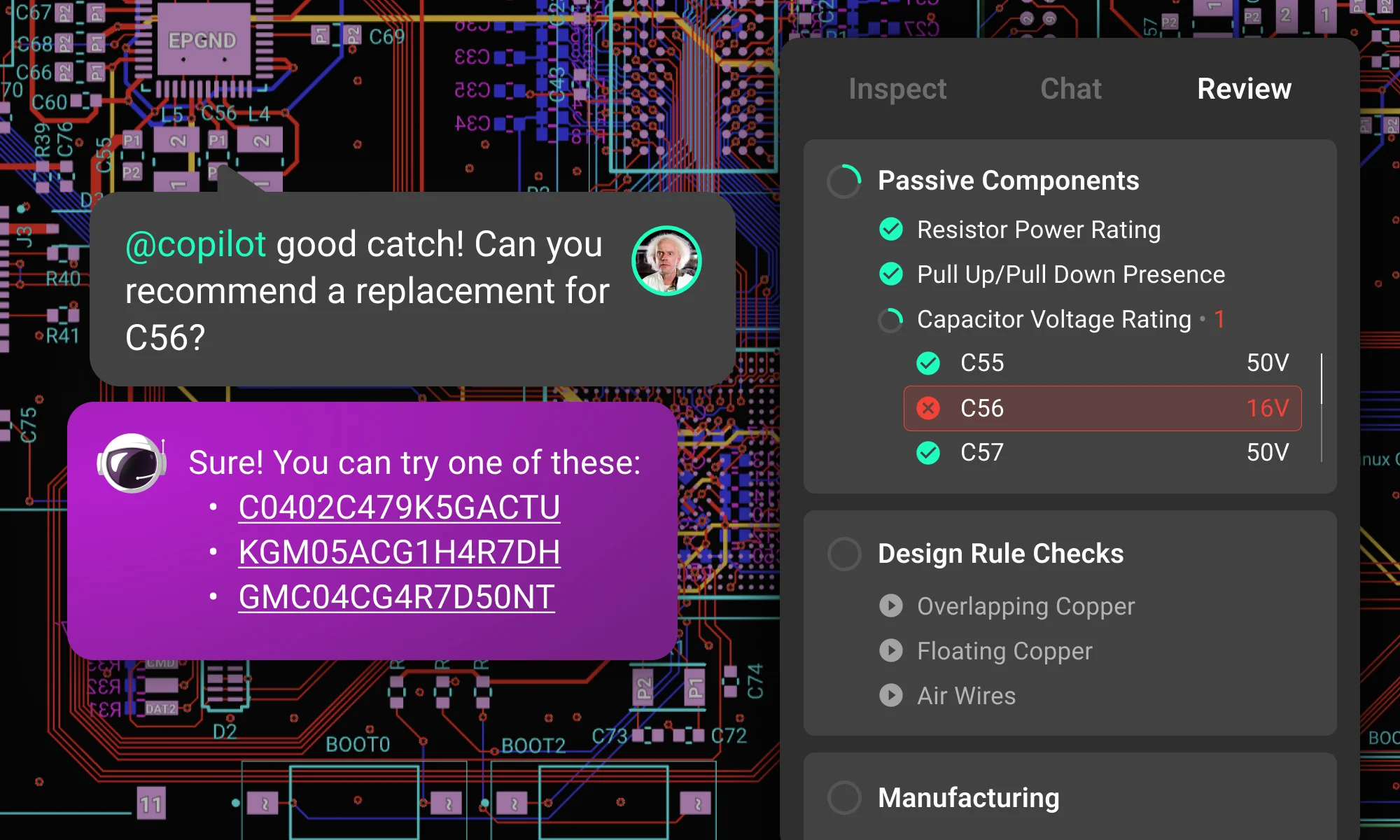
Creating a manufacturable, error-free PCB is never simple. Every engineer knows that missed details lead to production delays, costly revisions, and project setbacks. But what if you could have the power of a seasoned review team guiding you, 24/7?

We're excited to reveal a major upgrade - Flux Copilot is transitioning from being a helpful guide to a proactive partner. It no longer just advises but, with your approval, can now wires components together! This is a small step towards fully generative AI, reducing the time and complexity often associated with component connections.

Design review is one of the most time-consuming and expensive parts of the hardware design process. Most engineers spend over 30% of their time performing design reviews. What if we could reduce that so that products could ship 30% faster and 30% cheaper?


